

Modern work life often keeps people sitting for long hours. This habit can lead to fatigue, poor posture, and reduced focus. However, a manual standing desk offers a simple way to improve your daily routine. It helps you move more, stay alert, and work with better energy.
A crank adjustable desk is a practical solution for those who want flexibility without relying on electricity. Similarly, a non electric desk is reliable, affordable, and easy to maintain. When used correctly, these desks can boost both productivity and well-being.
In this guide, you will learn how to use a manual standing desk effectively. You will also discover practical tips to improve your workflow and stay comfortable throughout the day.
Understanding Manual Standing Desks
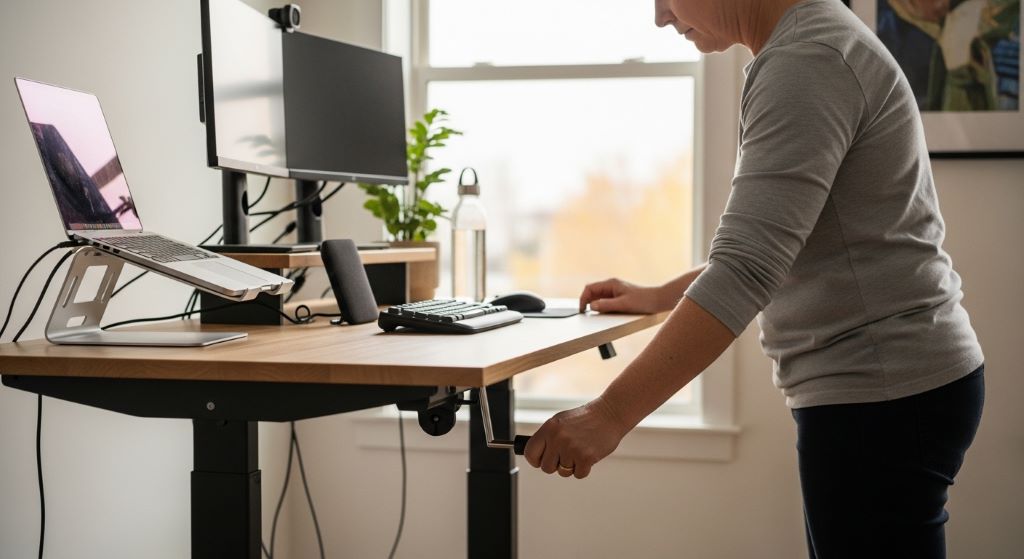
A manual standing desk allows you to change desk height using a hand crank or lever. Unlike powered models, it does not require electricity. Therefore, it works anywhere and offers long-term durability.
These desks are ideal for home offices, shared workspaces, and budget setups. Additionally, they provide more control over movement, since you adjust the height at your own pace.
Key Benefits of Using a Manual Standing Desk
Improved posture
When you alternate between sitting and standing, your body stays aligned. This reduces strain on your back and neck.
Better energy levels
Standing helps increase blood flow. As a result, you feel more awake and focused.
Cost-effective solution
A crank adjustable desk is usually cheaper than electric models. However, it still delivers the same health benefits.
No power dependency
A non electric desk works without cables or batteries. Therefore, it is ideal for areas with limited power access.
Increased movement
Frequent adjustments encourage you to move more during the day. This helps prevent stiffness and fatigue.
Setting Up Your Desk Correctly
Proper setup is essential for comfort and productivity. Without it, even the best desk will not deliver results.
Adjust the height properly
When standing, your desk should be at elbow level. Your arms should form a 90-degree angle. Additionally, your wrists should stay straight while typing.
Position your screen
Your monitor should be at eye level. This prevents neck strain. If needed, use a monitor riser or stack books.
Keep your feet stable
Wear comfortable shoes or use an anti-fatigue mat. This reduces pressure on your legs and feet.
Organize your workspace
Place frequently used items within easy reach. This avoids unnecessary stretching and improves workflow.
How to Transition from Sitting to Standing
Switching to a standing desk requires a gradual approach. If you stand too long too soon, it may cause discomfort.
Start slow
Begin with 15 to 30 minutes of standing per hour. Then, increase the duration over time.
Use a timer
Set reminders to change positions. This helps you build a healthy routine.
Listen to your body
If you feel tired, sit down. However, avoid staying in one position for too long.
Alternate frequently
The goal is movement, not constant standing. Therefore, switch between sitting and standing throughout the day.
Best Practices for Using a Manual Standing Desk
Maintain proper posture
Keep your shoulders relaxed and your back straight. Additionally, avoid leaning forward.
Use supportive accessories
An anti-fatigue mat, ergonomic chair, and keyboard tray can improve comfort.
Take short breaks
Walk around every hour. This refreshes your mind and reduces muscle tension.
Stay hydrated
Drinking water helps maintain energy and focus.
Adjust your desk mindfully
Using a crank adjustable desk allows you to control height smoothly. Therefore, make small adjustments instead of sudden changes.
Creating a Productive Work Routine
A standing desk alone will not boost productivity. You need a structured routine to see real results.
Plan your day
Start with a clear to-do list. This keeps you focused and organized.
Use standing time for active tasks
Standing is great for tasks like brainstorming, meetings, and reading. However, for deep work, you may prefer sitting.
Schedule breaks
Regular breaks prevent burnout. Additionally, they help maintain consistent performance.
Limit distractions
Keep your workspace clean and quiet. This improves concentration.
Common Mistakes to Avoid
Standing too long
Standing all day can be as harmful as sitting. Therefore, balance is key.
Poor desk height
Incorrect height leads to discomfort. Always adjust your desk carefully.
Ignoring posture
Even with a good desk, bad posture can cause pain.
Skipping breaks
Continuous work without breaks reduces productivity over time.
Overloading your desk
Keep only essential items on your desk. This improves efficiency and reduces clutter.
Comparing Manual and Electric Standing Desks
Manual desks
A non electric desk is simple, durable, and affordable. Additionally, it requires no maintenance related to motors.
Electric desks
These desks offer quick adjustments with the push of a button. However, they are more expensive and depend on power.
Which one is better?
If you value reliability and cost savings, a crank adjustable desk is a great choice. However, if convenience is your priority, an electric desk may suit you better.
Tips to Stay Comfortable While Standing
Wear supportive footwear
Good shoes reduce strain on your feet and legs.
Use an anti-fatigue mat
This improves comfort and reduces pressure.
Shift your weight
Move your weight from one foot to another. This prevents stiffness.
Stretch regularly
Simple stretches can relieve tension and improve circulation.
Keep moving
Small movements throughout the day make a big difference.
How Manual Standing Desks Improve Productivity
Better focus
Standing keeps your mind alert. Therefore, you can complete tasks more efficiently.
Reduced fatigue
Alternating positions prevents tiredness and boosts energy.
Improved mood
Movement releases endorphins, which enhance your mood.
Enhanced creativity
Standing encourages dynamic thinking. As a result, you may generate better ideas.
Health benefits
Reduced pain and improved posture lead to fewer distractions during work.
Long-Term Benefits of Using a Manual Desk
Using a manual standing desk consistently can improve your overall lifestyle.
You may experience fewer aches and pains. Additionally, your posture will improve over time. This leads to better confidence and comfort.
Moreover, regular movement supports heart health and reduces the risk of chronic conditions. Therefore, a simple desk change can have a lasting impact.
Conclusion
A manual standing desk is a powerful tool for improving productivity and health. By using it correctly, you can create a more active and efficient work routine.
Start by setting up your desk properly. Then, build a habit of alternating between sitting and standing. Additionally, focus on posture, movement, and regular breaks.
A crank adjustable desk offers flexibility and control, while a non electric desk provides reliability and simplicity. Together, these features make manual desks a smart choice for modern workspaces.
With the right approach, you can transform your workday, stay energized, and achieve better results.
FAQs
-
How long should I stand at a manual desk?
Start with 15 to 30 minutes per hour. Gradually increase as your body adapts.
-
Is a manual standing desk better than an electric one?
It depends on your needs. Manual desks are more affordable and durable, while electric desks offer convenience.
-
Can standing desks reduce back pain?
Yes, when used correctly, they improve posture and reduce strain on the spine.
-
Do I need special accessories for a standing desk?
Not necessarily, but items like an anti-fatigue mat and ergonomic chair can enhance comfort.
-
How often should I adjust my desk height?
Switch positions every 30 to 60 minutes to maintain energy and comfort.
Related Topics:
How Blockchain Revolutionizes Supply Chain Transparency in the Food Industry
Gamification Strategies for Employee Upskilling: Boosting Engagement Through Play