
How to Improve Business Transparency with a Business Activity Monitor
Business transparency is no longer optional. Customers, employees, and investors all expect to know what is happening inside a company. However, tracking every process, task, and workflow manually is nearly impossible. This is where a business activity monitor becomes essential.
A business activity monitor, often called a BAM tool, gives organizations real-time visibility into their operations. It tracks data across systems and presents it in a clear, digestible format. Therefore, decision-makers can spot problems early and act quickly. In this article, you will learn how to use a business activity monitor to improve transparency at every level of your organization.
What Is a Business Activity Monitor?
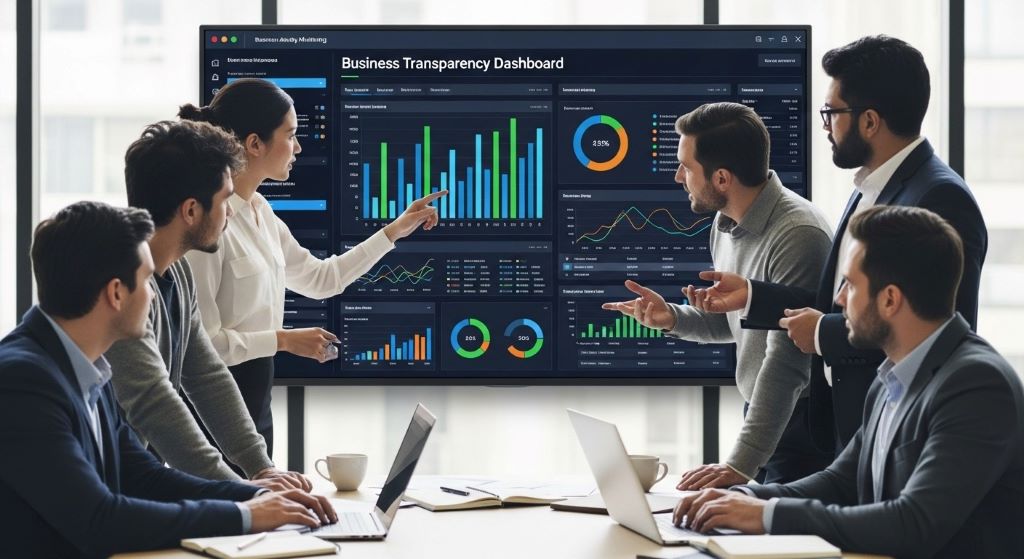
A business activity monitor is a software tool that collects, tracks, and displays data from various business processes in real time. It connects to your existing systems, such as ERP platforms, CRMs, and supply chain tools. Then, it pulls relevant data and shows it on a central dashboard.
Unlike traditional reporting tools, a business activity monitor does not just show you what happened yesterday. Instead, it shows you what is happening right now. This live view helps teams stay aligned and reduces the chance of costly surprises.
Additionally, most modern BAM tools allow you to set alerts and thresholds. When a metric goes outside of a normal range, the system sends a notification. As a result, your team can respond before a small issue becomes a big problem.
Why Business Transparency Matters
Transparency builds trust. When employees understand how decisions are made and how performance is measured, they feel more confident in their roles. Furthermore, transparent organizations tend to attract better talent because people want to work in environments where communication is open and honest.
From a customer perspective, transparency creates loyalty. Clients who can see the status of their orders, projects, or support tickets are far less likely to feel frustrated. They feel informed and valued. Therefore, businesses that prioritize visibility tend to see higher satisfaction rates.
On the other hand, a lack of transparency often leads to confusion and inefficiency. Teams work in silos, duplicating efforts or missing important updates. Over time, this erodes morale and performance. A business activity monitor directly addresses this by giving everyone access to the same real-time information.
How a Business Activity Monitor Improves Transparency
Centralizing Data from Multiple Sources
One of the biggest challenges in business transparency is fragmented data. Different departments use different tools, and the data rarely speaks to each other. A business activity monitor solves this by integrating with multiple platforms and pulling data into one unified view.
For example, your sales data, logistics updates, and customer service tickets can all appear on the same screen. This means your leadership team does not need to log into five separate systems to get a full picture. Instead, everything is available in one place, at any time.
Providing Real-Time Operational Visibility
Real-time visibility is the core benefit of any good business activity monitor. Rather than waiting for end-of-day reports, managers can see live updates as events unfold. This is particularly valuable in fast-moving industries like logistics, manufacturing, and financial services.
Consider a warehouse operation. With a BAM tool in place, supervisors can see exactly how many orders have been processed, which shipments are delayed, and where bottlenecks are forming. Consequently, they can reassign resources before delays grow into larger disruptions.
Enabling Proactive Issue Resolution
Business activity monitors do not just show you what is happening. They also alert you when something is about to go wrong. By setting custom thresholds, you can receive notifications when performance dips below acceptable levels. This proactive approach saves time and reduces costs.
Moreover, historical data stored in the system allows teams to identify recurring patterns. If a particular process fails every Friday afternoon, the data will reveal it. Therefore, teams can address root causes rather than just treating symptoms.
Key Features to Look for in a Business Activity Monitor
Not all BAM tools are created equal. When choosing the right one for your business, look for these essential features:
- Real-time dashboards that update automatically without requiring manual refreshes.
- Customizable alerts and notifications that can be tailored to your specific KPIs and thresholds.
- Integration capabilities with your existing software stack, including ERPs, CRMs, and cloud platforms.
- Role-based access controls so that each team member sees only the data relevant to their function.
- Audit trails and historical logs that support accountability and compliance reporting.
Additionally, ease of use matters. A complex interface will discourage adoption. Therefore, choose a tool that your team can learn quickly without extensive training.
Steps to Implement a Business Activity Monitor in Your Organization
Step 1 – Define Your Transparency Goals
Before you install any software, take time to clarify what you want to achieve. Ask yourself which processes need better visibility and who needs access to that information. Without clear goals, you risk collecting data that nobody uses.
Step 2 – Map Your Key Processes and Data Sources
Next, identify the systems and processes that your BAM tool will need to monitor. Create a simple map showing how data flows through your organization. This will help you choose the right integrations and avoid gaps in coverage.
Step 3 – Choose the Right BAM Tool
With your goals and data map in hand, you can evaluate BAM tools more objectively. Compare features, pricing, and integration options. Request demos and involve your IT team in the selection process. Furthermore, check vendor reviews and case studies from similar industries.
Step 4 – Configure Dashboards and Set Alerts
Once you have selected a tool, work with your team to design dashboards that reflect your transparency goals. Avoid cluttering screens with unnecessary metrics. Instead, focus on the KPIs that drive real decisions. Then, configure alerts for any metric that, if ignored, could lead to significant problems.
Step 5 – Train Your Team and Encourage Adoption
Technology is only effective when people use it. Schedule training sessions and create simple guides for each department. Encourage managers to reference the BAM dashboard in team meetings. Over time, using the tool will become a natural part of how your organization operates.
Common Challenges and How to Overcome Them
Implementing a business activity monitor is not always smooth. However, knowing the common challenges in advance helps you prepare.
Data overload is a frequent issue. When too many metrics are displayed, people stop paying attention to all of them. To avoid this, start small. Monitor a few critical processes first and expand gradually as your team gets comfortable with the tool.
Resistance to change is another challenge. Some employees may feel threatened by increased visibility into their work. Therefore, it is important to communicate that the goal is improvement, not surveillance. Frame transparency as a team benefit, not a management tool.
Finally, data quality can be a problem. If the underlying systems feed inaccurate data into the BAM tool, the dashboards will mislead rather than guide. Consequently, invest time in cleaning and standardizing your data before integration.
Real-World Benefits of Business Activity Monitoring
Organizations that adopt business activity monitoring report measurable improvements across multiple areas. Teams communicate better because everyone shares the same real-time data. Decisions become faster because information is always available. Additionally, compliance becomes easier because the tool automatically logs activity for audit purposes.
In customer-facing roles, BAM tools reduce response times significantly. Support agents can see the full history of a customer’s interactions without switching between systems. This leads to faster resolutions and higher satisfaction scores.
Furthermore, business activity monitors improve accountability. When every team member can see performance data, underperformance becomes visible and harder to ignore. However, this must be balanced with a supportive culture that focuses on growth rather than blame.
Conclusion
Improving business transparency is one of the most valuable investments an organization can make. A business activity monitor makes this possible by centralizing data, providing real-time visibility, and enabling proactive problem-solving.
To get started, define your transparency goals, map your processes, and choose a BAM tool that fits your needs. Then, configure meaningful dashboards, train your team, and overcome common challenges with clear communication and strong data practices.
Ultimately, transparency is not just about showing data. It is about building a culture where information flows freely and every team member can contribute at their best. A business activity monitor gives you the foundation to make that culture a reality.
Frequently Asked Questions
1. What is the main purpose of a business activity monitor?
A business activity monitor tracks and displays real-time data from business processes. Its main purpose is to give organizations clear, up-to-date visibility into operations so they can make faster and better-informed decisions.
2. How does a business activity monitor improve transparency?
It centralizes data from multiple systems into a single dashboard. This gives all relevant stakeholders access to the same information at the same time. As a result, silos break down and communication improves across departments.
3. Is a business activity monitor suitable for small businesses?
Yes. Many BAM tools are scalable and offer pricing plans suitable for smaller organizations. Even a small business benefits from real-time visibility into key processes like sales pipelines, customer service queues, and inventory levels.
4. What types of data can a business activity monitor track?
A BAM tool can track a wide range of data, including transaction volumes, order statuses, customer service metrics, employee performance, system uptime, and supply chain events. The exact data depends on the integrations you configure.
5. How long does it take to implement a business activity monitor?
Implementation time varies based on the complexity of your systems and the number of integrations required. A simple setup can be completed in a few days. However, a large enterprise rollout with multiple data sources may take several weeks.
Related Topics:
Cloud Security Best Practices for Small Businesses: A Guide to Staying Safe
Best CRM Software for Solopreneurs on a Limited Budget: Your Path to Organized Success